Vortex flowmeter display screen
Price:¥1.00Quantity:9999
Market Price:¥1.00Reduced Price:¥1.00
Effevtive Time:7/10/2026
Sale Address:SilverProduction Address:Silver automation instruments
Keywords:How to deal with the display exceeding the range of vortex flowmeter | How to solve the display exceeding the range of vortex flowmeter | Common faults and troubleshooting methods of vortex flowmeter? |Method for reading flow meters|
Phone:QQ:Click:Wechat: +86 13512131526
Company:SILVER AUTOMATION INSTRUMENTS
『Vortex flowmeter display screen』Related information(clamp on meter|electromagnetic meter|venturi meterrotameter|orifice meter|ultrasonic flow meter|mass flow meter|coriolis mass flow meter|coriolis flow meter|magnetic flow meter|magmeter flow meter|magflow flow meter|mag meter flow meter|electromagnetic flow meter|vortex flow meter|turbine flow meter|thermal mass flow meter|thermal flow meter|rotameter flow meter)
1. Installation specifications for vortex flowmeter?
① The direction of the flow arrow of the flowmeter should be consistent with the direction of fluid flow in the pipeline. ② The installation of the flow meters pipe socks must meet the requirements for the front and rear straight pipe sections specified above. Otherwise, it will affect the measurement accuracy of the flowmeter and seriously damage the flowmeter. ③ During the installation of a flowmeter, the flowmeter must not be placed on the pipeline during the welding of flanges or pipelines to avoid damaging the internal components of the flowmeter. ④ Before operating the flowmeter, carefully observe whether the installation and wiring of the flowmeter are correct and error free. ⑤ After connecting the power, observe whether there is a flow display on the LCD screen. ⑥ Slowly open the valve for no less than 2 minutes until a lower pressure is reached, and then stop. Changye should observe whether there is any leakage around the sensor and whether the LCD screen displays the flow rate. ⑦ If the situation is alarming, open the valve and stabilize for a period of time, then observe whether the flow rate displayed on the LCD screen is normal.
2. How to solve the problem of excessive range displayed by vortex flowmeter
The core solution to excessive range displayed by vortex flowmeter is to first investigate the cause of the excess range, and then deal with it in a targeted manner, which can be divided into two directions: rapid emergency and radical solutions.
. 1. Step 1: Quickly determine the type of overrange. You can distinguish it by the alarm prompt and output signal range of the flowmeter: - Positive overrange: The measured value is 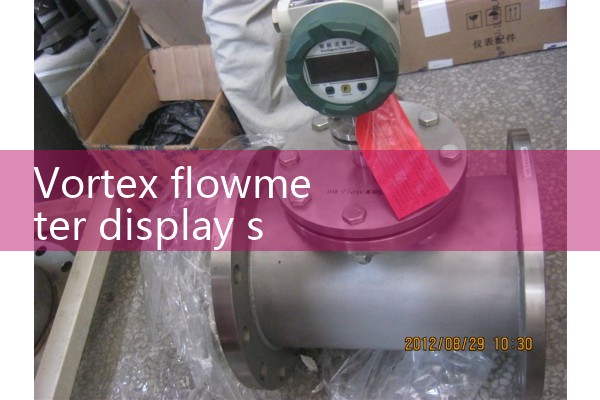 higher than the maximum range limit of the flowmeter, which is common in situations where the actual flow rate is too large or the signal acquisition is abnormal. - Negative overrange: The measured value is below the lower limit of the range and imitates, often resulting in negative values and zero drift when there is no flow Specific solution based on different scenarios 2.1 Actual flow exceeding the rated range of the flow meter is the most common reason, and there are two ways to deal with it: - Temporary emergency: temporarily reduce the medium flow in the pipeline to bring the measured value back within the range, avoiding hardware overload damage to the flow meter - Radical solution: replace with a larger range of vortex street flow meters, and reserve more than 30% margin when selecting. For example, if the actual peak flow rate is 100m ³/h, 130-150m ³/h should be selected Range model - Supplementary operation: If the flow rate fluctuation is too large under working conditions, a throttle orifice plate or flow control valve can be installed to stabilize the medium flow rate entering the flowmeter. 2.2 Error in instrument parameter setting - Check range setting: Enter the flowmeter parameter menu and confirm whether the current set range upper limit matches the actual working conditions. Some misoperation may cause the range to be set too small, resulting in display exceeding the range. - Calibrate zero point: When there is no medium flow, perform zero point calibration operation to eliminate zero point offset caused by installation tilt or medium residue. - Reset instrument: If the parameters are chaotic, reset the range, medium type, temperature and pressure compensation parameters after restoring the factory set
『SILVER Official Website SERVICE』



 Hot Product
 Related AD